

Bootstrap a Synchronizer
This howto assumes familiarity with general Synchronizer concepts. Refer to the Canton overview for more information.Set up a centralized Synchronizer
In a centralized Synchronizer, the operator has access to all Sequencer and Mediator nodes. A centralized Synchronizer is the simplest to set up and manage, but it assumes that a single fully trusted entity owns and operates the Synchronizer. You can bootstrap a centralized Synchronizer by specifying a single owner and asynchronizerThreshold of 1. This respectively means that only that owner can authorize topology changes on the Synchronizer, and that one signature is sufficient for that.
First, make sure that the nodes are fresh and haven’t yet been initialized:
ping command:
Set up a decentralized Synchronizer
This subsection covers the most frequent case where distinct operators manage decentralized Synchronizer nodes on behalf of the respective owners. This also means that they’re managed from separate console environments. In this case, the bootstrapping process must be coordinated in lockstep between the Synchronizer nodes, with the coordination and exchange of data happening through secure communication channels. As an overview, to bootstrap a decentralized Synchronizer with separate consoles, operators:- Fix the initial parameters.
- Exchange Synchronizer identities.
- Collectively create a decentralized namespace (see the Canton overview for more information); each operator:
- Signs the bootstrapping topology transactions.
- Exchanges the bootstrapping topology transactions with other operators.
- Initializes their Synchronizer nodes.
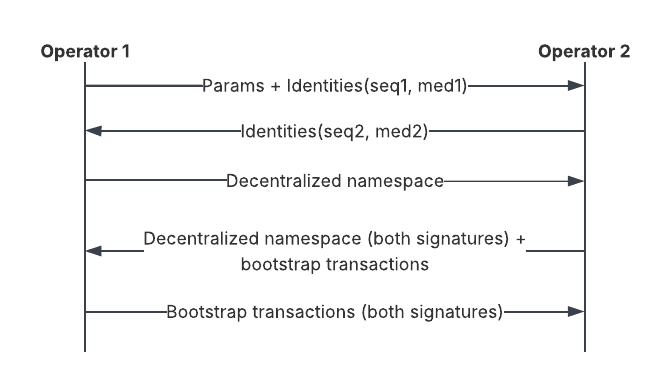
Before proceeding, ensure that all of the nodes in the decentralized Synchronizer are started.
Set up a decentralized Synchronizer with a subset of Sequencers as owners
The previous subsection describes how to bootstrap a decentralized Synchronizer using multiple Sequencers that are all Synchronizer owners. This subsection describes how to bootstrap a decentralized Synchronizer using multiple Sequencers when only a subset of Sequencers are Synchronizer owners. Similar to the previous subsection, distinct operators may manage different Synchronizer nodes from separate console environments. The bootstrapping process must be coordinated in lockstep between the Synchronizer nodes, with the coordination and exchange of data happening through secure communication channels. This how-to uses four Sequencer nodes and two Mediator nodes. Only two of the Sequencer nodes (the first and second) are Synchronizer owners, and all four Sequencer nodes are managed by distinct operators. Although this how-to shares many bootstrapping commands in common with the previous subsection, there are subtle differences showing the commands that owner and non-owner Sequencer nodes should perform, respectively.Before proceeding, ensure that all of the nodes in the decentralized Synchronizer are started.
Bootstrap a permissioned Synchronizer
The first layer of Synchronizer security is restricting access to the Public API network endpoints of the Sequencers. This can be done using standard network tools such as firewall rules and virtual private networks. Individual Synchronizers can be open, allowing any Participant with a connection to a Sequencer node to join and participate in the network, or permissioned, in which case the Synchronizer owners need to explicitly authorize a Participant before it can register with the Synchronizer and use it. While the Canton architecture is designed to be resilient against malicious Participant Nodes, explicitly restricting which Participant Nodes can join the network constitutes an effective second line of defense. This subsection explains how to make a decentralized Synchronizer permissioned. For simplicity, it assumes a single trusted operator accessing all nodes from a single console environment. First, let all Synchronizer owners set theonboardingRestriction dynamic Synchronizer parameter to RestrictedOpen:
Propagating and processing topology proposals may require some time, so you may have to retry before the submission authorization is visible.
Add New Nodes
Add a new Sequencer to a distributed Synchronizer
You can either initialize Sequencers as part of the regular distributed synchronizer bootstrapping process, or dynamically add a new Sequencer at a later point as described in this section. The reverse procedure is documented in the Sequencer decommissioning section.Database Sequencer
The Database Sequencer is currently unsupported.BFT Sequencer
- Assuming that at least one existing Sequencer is accessible, prepare a new Sequencer and make sure it’s running.
-
Run the following
bootstrapcommand using instance references of the new Sequencer, the existing Sequencer, and the owners of the current Synchronizer: -
Set up new connections in either or both directions for all Sequencers using the following commands:
For the newly-onboarded Sequencer, the endpoints can be configured as part of the initial network.
-
Wait for the new Sequencer to get initialized:
participant_response_timeout and mediator_reaction_timeout dynamic synchronizer parameters with a default of 30 seconds each) before connecting nodes to a newly-onboarded Sequencer.
If you encounter issues, refer to the troubleshooting guide.
For details on the necessary admin commands, check the reference documentation.
Use separate consoles
Similarly to initializing a distributed synchronizer with separate consoles, dynamically onboarding new Sequencers can be achieved in separate consoles as follows:Add a new Mediator to a distributed Synchronizer
You can either initialize Mediators as part of the regular distributed synchronizer bootstrapping process, or dynamically add a new Mediator at a later point as described in this section.- Prepare a new Mediator node and make sure it’s running.
-
Save the new Mediator’s identity and load it to relevant Sequencers:
-
Propose a new Mediator state with active Mediators including the newly-onboarding Mediator:
-
Initialize the new Mediator:
Manage dynamic Synchronizer parameters
In addition to the static Synchronizer parameters that you specify during Synchronizer bootstrap, you can change some parameters at runtime ( while the Synchronizer is running); these are referred to as
dynamic synchronizer parameters. When the Synchronizer is bootstrapped, the default values are used for the dynamic Synchronizer parameters.Get dynamic Synchronizer parameters
You can get the current parameters on a Synchronizer you are connected to using the following command:Change dynamic Synchronizer parameters
You can set several dynamic parameters at the same time:
When increasing
max request size, the sequencer nodes need to be restarted for the new value to be taken into account.Recover from too-small max request size
MaxRequestSize is a dynamic parameter. This parameter configures both the gRPC channel size on the Sequencer node and the maximum size that a Sequencer client is allowed to transfer.
If the parameter is set to a very small value (roughly under 30kb), Canton can crash because all messages are rejected by the sequencer client or by the sequencer node. This cannot be corrected by setting a higher value within the console, because this change request needs to be sent via the sequencer and will also be rejected.
To recover from this crash, you need to configure override-max-request-size on both the Sequencer node and all Sequencer clients.
This means you need to modify both the Synchronizer and the Participant Node configuration as follows:
maxRequestSize value, then delete the added configuration in the previous step, and finally perform the restart again.
Sequencer Traffic Management
Currently traffic management is supported only on Byzantine Fault Tolerant (BFT) Synchronizers.
Enable traffic management on a Synchronizer
Traffic management can be enabled or disabled on an existing Synchronizer via adjusting its dynamic synchronizer parameters. Please refer to the Change dynamic synchronizer parameters for more details. First let’s check the current traffic management status of a Synchronizer:trafficControl of type TrafficControlParameters is not set (absent in the output above) or has enforceRateLimiting set to false then the traffic management is inactive.
To enable traffic management, you update the dynamic synchronizer parameters, setting the TrafficControlParameters with the enforceRateLimiting = true and specifying desired values for the other parameters documented in configuration class Scaladoc reference.
If you are using a Synchronizer with multiple owners, you need to ensure that the command to enable traffic management is submitted by at least the configured threshold of owners.
sequencer1 being the only synchronizer owner, run the following command to enable traffic management:
traffic control in the output above.
Check the latest traffic balances of Synchronizer members
One can interactively inspect and modify the traffic balances of Synchronizer members using the Canton console commands undersequencer.traffic_control.
To inspect the traffic balances of all members of a Synchronizer, you can use the following command:
Top up the traffic balance for a Synchronizer member
Traffic balance entitlements of members are decided by an external workflow and communicated via submitting the same traffic balance via one or multiple Sequencers.
Top ups must be submitted by a quorum of Sequencers to become effective. This is configured by the
threshold parameter of the SequencerSynchronizerState topology mapping.participant1. First we need to know the current serial (a per-member monotonically increasing PositiveInt), which corresponds to the last traffic balance top up for that member.
participant1 by newBalance:
participant1 has been updated. You can verify this by checking the traffic state again:
ping between participants and observe the traffic consumption:
Synchronizer Pruning
Prune the Mediator state
You can set up scheduled automatic pruning for each of your Mediators as explained here. You can also directly prune the Mediator without using a schedule by calling the following command:mediator.pruning.prune_with_retention_period or even the exact timestamp to prune at, using mediator.pruning.prune_at.
Prune the Sequencer state
You can prune the Sequencer by calling the following command:sequencer.pruning.prune_with_retention_period or even the exact timestamp to prune at, using sequencer.pruning.prune_at.
Unblock pruning due to inactive sequencer members
All Sequencer clients, such as Participants or Mediators, periodically acknowledge the timestamp of the latest event they have received from the Sequencer. These acknowledgements, which all Sequencers can see, allow the Sequencers to compute the highest timestamp that all clients have achieved. This timestamp serves as a safe pruning point. You can check the Sequencer pruning status as follows:status.safePruningTimestamp. The Sequencer can only perform pruning earlier than that point. Otherwise, one or more clients would be unable to continue operation.
If a Sequencer client goes inactive for some time, then all Sequencers are blocked from pruning past this client’s latest acknowledged timestamp. To unblock a Sequencer from pruning at more recent timestamps, either the client must come back and acknowledge newer events or you must disable that client on the Sequencer.
The Sequencer has force-prune commands. The difference between these and the regular prune commands is that the force-prune commands disable members that are preventing pruning from happening at the given timestamp.
You can force prune at a given timestamp as follows:
dryRun to true produces a list of the clients that would be disabled, if any, as part of the operation, without actually performing the pruning. To perform the pruning operation, run it with dryRun set to false.
If you’ve identified a problematic client you don’t need to serve, you can directly disable it by calling the repair command repair.disable_member(client).
Note that when you disable a client on a Sequencer, this is a local operation; the client is still active on other Sequencers that have not performed the same operation.
BFT Orderer Pruning
The BFT Orderer layer of the Sequencer is where distributed consensus on the order of transactions is reached across all Sequencer nodes. It has its own separate set of database tables and different considerations regarding pruning. The BFT Orderer serves ordered events up to the Sequencer layer, which stores them and subsequently serves them to Sequencer clients. The BFT Orderer also needs to retain this data after it is served to the Sequencer layer, because it may need to assist other BFT Orderer nodes that are behind in catching up. You must pick a pruning retention period long enough for BFT Orderer nodes to be able to catch up after crashing and coming back. See below how to manually prune using an admin command and also check the status.High Availability in Synchronizer
Mediator
The mediator service uses a hot standby mechanism with an arbitrary number of replicas. During a mediator fail-over, all in-flight requests get purged. As a result, these requests will timeout at the participants. The applications need to retry the underlying commands.Running a Stand-Alone Mediator Node
A synchronizer may be statically configured with a single embedded mediator node or it may be configured to work with external mediators. Once the synchronizer has been initialized further mediators can be added at runtime. By default, a synchronizer will run an embedded mediator node itself. This is useful in simple deployments where all synchronizer functionality can be co-located on a single host. In a distributed setup where synchronizer services are operated over many machines, you can instead configure a synchronizer manager node and bootstrap the synchronizer with mediator(s) running externally. Mediator nodes can be defined in the same manner as Canton participants and synchronizers.HA Configuration
Only PostgreSQL and Oracle-based storage are supported for mediator HA. Mediator node replicas are configured in the Canton configuration file as individual stand-alone mediator nodes with two required changes for each mediator node replica:- Using the same storage configuration to ensure access to the shared database.
- Set
replication.enabled = truefor each mediator node replica.
Starting from canton 2.4.0, mediator replication is enabled by default when using supported storage.
Sequencer
The database-based sequencer can be horizontally scaled and placed behind a load balancer to provide high availability and performance improvements. Deploy multiple sequencer nodes for the synchronizer with the following configuration:
- All sequencer nodes share the same database so ensure that the storage configuration for each sequencer matches.
- All sequencer nodes must be configured with
high-availability.enabled = true.
Starting from Canton 2.4.0, sequencer high availability is enabled by default when using supported storage.
Total node count
Thesequencer.high-availability.total-node-count parameter is used to divide up time among the database sequencers. The parameter should not be changed once a set of sequencer nodes has been deployed. Because each message sequenced must have a unique timestamp, a sequencer node will use timestamps modulo the total-node-count plus its own index to create timestamps that do not conflict with other sequencer nodes while sequencing the messages in a parallel database insertion process. Canton uses microseconds, which yields a theoretical max throughput of 1 million messages per second per synchronizer. Now, this theoretical throughput is divided equally among all sequencer nodes (total-node-count). Therefore, if you set total-node-count too high, then a sequencer might not be able to operate at the maximum theoretical throughput. We recommend keeping the default value of 10, as all above explanations are only theoretical and we have not yet seen a database/hard disk that can handle the theoretical throughput. Also note that a message might contain multiple events, such that we are talking about high numbers here.
External load balancer
Using a load balancer is recommended when you have a http2+grpc supporting load balancer available, and can’t/don’t want to expose details of the backend sequencers to clients. An advanced deployment could also support elastically scaling the number of sequencers available and dynamically reconfigure the load balancer for this updated set. An example HAProxy configuration for exposing GRPC services without TLS looks like: frontend domain_frontend bind 1234 proto h2 default_backend domain_backend backend domain_backend option httpchk http-check connect http-check send meth GET uri /health balance roundrobin server sequencer1 sequencer1.local:1234 proto h2 check port 8080 server sequencer2 sequencer2.local:1234 proto h2 check port 8080 server sequencer3 sequencer3.local:1234 proto h2 check port 8080 Please note that for quick failover, you also need to add HTTP health checks, as otherwise, you have to wait for the TCP timeout to occur before failover happens. The Public API of the sequencer exposes the standard GRPC health endpoints, but these are currently not supported by HAProxy, hence you need to fall back on the HTTP/health endpoint.Client-side load balancing
Using client-side load balancing is recommended where an external load-balancing service is unavailable (or lacks http2+grpc support), and the set of sequencers is static and can be configured at the client. To simply specify multiple sequencers use thesynchronizers.connect_multi console command when registering/connecting to the synchronizer:
Configure Synchronizer APIs
A Synchronizer exposes two main APIs, the Admin API and the Public API, while the Participant Node exposes the Ledger API and the Admin API. In this section, we explain what the APIs do and how they can be configured. For details on how to configure endpoints and their addresses, ports, keep alive, and so on, see the general API documentation.Configure Sequencer Public API
The Sequencer Public API provides the services to other nodes to connect, authenticate, and exchange messages with a Synchronizer. To learn more about the Sequencer’s role, visit the Sequencer overview page. Configure the Public APIpublic-api under a Sequencer node configuration:
127.0.0.1. To find out more about the parameters, check the reference documentation.
Configure Sequencer Admin API
The Sequencer Admin API can be configured in the standard way under the Sequencer node configuration (at the same level as the Public API).Configure Mediator Admin API
The Mediator Admin API can be configured in the standard way under the Mediator node configuration:Configure Sequencer Backend
The following page describes the basics of configuring Sequencer backends. For more advanced configuration, refer to the following sections:
- High availability
- Pruning
- Optimization
Database Sequencer
The Database Sequencer is currently unsupported and should not be configured.BFT Sequencer
Minimal BFT Sequencer backend configuration
To use the Byzantine Fault Tolerant (BFT) Sequencer, set thetype parameter to BFT under `sequencer`:
Configure initial peers (optional)
If the network contains more than one node, configure the server endpoint underinitial-network. There, you can also configure peer endpoints, or do so using admin commands later. Pre-configuring the peer endpoints reduces the number of manual configuration steps, which saves time, reduces errors, and accelerates the deployment process.
address and port pair under server-endpoint make up an endpoint where the BFT Sequencer’s gRPC server listens. If the port is not specified, the operating system chooses one for you. The external-address and external-port form an externally available endpoint that other peers can connect to. Usually, the external-address is the domain name of a reverse proxy that points to the listening endpoint. The external endpoint must be configured correctly for clients to successfully authenticate the server.
Transport Layer Security (TLS) is enabled by default for the external endpoint and peer endpoints. For simplicity, it is disabled in the config example. However, it is recommended to configure it in the standard way with:
For more details on the
tlsunderserver-endpointfor the internal server endpointexternal-tls-configunderserver-endpointfor the external endpointtls-configunderpeer-endpointsfor peer endpoints
initial-network configuration, check the reference documentation.
Configure authentication (optional)
Authentication is enabled by default. It can be configured withendpoint-authentication under initial-network (at the same level as server-endpoint):
Configure dedicated storage (optional)
To use dedicated storage, configurestorage under config as for the top-level Sequencer storage configuration.
While the BFT Sequencer defaults to using the top-level Sequencer storage, configuring dedicated storage offers greater flexibility. It allows you to:
- Support distinct data read and write patterns with different database backends and settings
- Separate backups
Configure network-wide parameters
If you change the defaults, keep the following parameters in sync across the network:All the above parameters reside under
- `epoch-length`: a length of all epochs
- `max-requests-in-batch`: a maximum number of requests in a batch, validated at runtime
- `max-batches-per-block-proposal`: a maximum number of batches per block proposal, validated at runtime
config and must be the same across all BFT Orderer nodes.
For details on the related concepts, check the BFT Orderer explanation page.
Configure other (local) parameters
There are other (local) configuration parameters underconfig that can be changed.
For details, check the reference documentation.
External Sequencer
To use an external Sequencer (for example, CometBFT), configure the underlying Sequencertype under config in the sequencer configuration:
Secure Synchronizer APIs
Sequencer Public API
Public API
The synchronizer configuration requires the same configuration of theAdmin API as the participant. Next to the Admin API, we need to configure the Public API, which is the API where all participants connect.
TLS Encryption
As with the Admin API, network traffic can (and should) be encrypted using TLS. This is particularly crucial for the Public API. An example configuration section which enables TLS encryption and server-side TLS authentication is given by:#22917: Fix broken literalinclude literalinclude:: CANTON/enterprise/app/src/test/scala/com/digitalasset/canton/integration/tests/MultiSynchronizerIntegrationTests.scala start-after: architecture-handbook-entry-begin: TlsConnect end-before: architecture-handbook-entry-end: TlsConnect dedent:
Server Authentication
Canton has two ways to perform server authentication to protect from man-in-the-middle attacks: TLS and the synchronizer id. If TLS is used on the Public API as described above, TLS also takes care of server authentication. This is one of the core functions of TLS. Server authentication can also be performed by the synchronizer operator passing their synchronizer identity to the participant node operator, and checking that the identity matches that reported by the synchronizer to the participant node. Like all nodes, the synchronizer has an identity that corresponds to the fingerprint of its namespace root key. It reports its identity to connecting participant nodes and signs all its messages with keys authorized by that namespace root key on the topology ledger. Assuming no key compromises, this gives participants a guarantee that the reported identity is authentic. The synchronizer id of the sole connected synchronizer can be read out using console commands like:Client Authentication
Unlike the ledger or Admin API, the Public API uses Canton’s cryptography and topology state for client authentication rather than mutual TLS (mTLS). Clients need to connect to the Public API in several steps:- The client calls the
SequencerConnectServiceto align on Canton Protocol versions and obtain the synchronizer id. - During the first connection, the client registers by sending its minimal topology state (identity, key delegations, public keys) to the sequencer.
- The client calls the
SequencerAuthenticationServiceto authenticate using a challenge-response protocol and get an access token for the other sequencer services. - The client connects to the main
SequencerServiceusing the access token from 3.
permissioned-synchronizer) or if the topology state provided is invalid.
During step 3, the client claims an identity, which is the fingerprint of a namespace root key. If that identity is registered (as done in step 2), the sequencer responds with a challenge consisting of a nonce and all fingerprints of signing keys authorized for that member as per the topology ledger. If the challenge is met successfully by signing the nonce appropriately with a key matching one of the authorized keys, the SequencerAuthenticationService responds with a time-limited token which can be used to authenticate more cheaply on the other Public API services.
This authentication mechanism for the restricted services is built into the public sequencer API. You don’t need to do anything to set this up; it is enforced automatically and can’t be turned off.
The expiration of the token generated in step 2 is valid for one hour by default. The nodes automatically renew the token in the background before it expires. The lifetime of the tokens and of the nonce can be reconfigured using
logout console command to immediately revoke all valid tokens of that member and close the sequencer connections. The legitimate member automatically reconnects and obtains new tokens through the challenge-response protocol described above.
The command is slightly different depending on whether the member is a participant or a mediator, for example:
Replace with references to the commands. #22919
Set sequencer resource limits
Protect against large requests
Max request size is a dynamic Synchronizer parameter. You update themaxRequestSize field when you change the dynamic Synchronizer parameters.
Protect the Sequencer via rate limiting
Confirmation request max rate is a dynamic Synchronizer parameter. You update theconfirmationRequestsMaxRate field when you change the dynamic Synchronizer parameters.
Protect the Byzantine Fault Tolerance orderer from large requests
When starting the Byzantine Fault Tolerance (BFT) orderer, you can provide limits for bothmax-request-payload-bytes how many bytes one transaction can handle, and max-request-in-batch for how many transactions can be handled in a batch.
Do note that
max-requests-in-batch is a network wide parameter and should be the same for all orderers in the network.Protect the Sequencer from too many acknowledgements
To limit the amount of acknowledgements on the network, the Sequencer can conflate acknowledgements that come from the same member and are too close in time to each other. You can configure the window by setting the following value in the config.Limit Sequencer submissions via traffic management
You can protect a Synchronizer from excessive traffic from its members by enabling traffic management.Decommissioning Canton nodes and Synchronizer entities
This guide assumes general familiarity with Canton, in particular Canton identity management concepts and operations from the Canton console. Note that, while onboarding new nodes is always possible, a decommissioned node or entity is effectively disposed of and cannot rejoin a synchronizer. Decommissioning is thus an irreversible operation. In addition, decommissioning procedures are currently experimental; regardless, backing up nodes to be decommissioned before decommissioning them is strongly recommended.Decommissioning a Sequencer
Sequencers are part of a synchronizer’s messaging infrastructure and do not store application contracts, so they are disposable as long as precautions are taken to avoid disrupting the synchronization services. This means, concretely, ensuring that:- No active participant nor active mediator is connected to the sequencer to be decommissioned.
- All active participants and mediators are connected to an active sequencer.
Disconnecting all nodes from the sequencer to be decommissioned
- Change the sequencer connection on the mediators connected to the sequencer to be decommissioned to use another active sequencer, as per mediator connectivity:
#22917: Fix broken literalinclude literalinclude:: CANTON/enterprise/app/src/test/scala/com/digitalasset/canton/integration/tests/offboarding/SequencerOffboardingIntegrationTest.scala language: scala start-after: user-manual-entry-begin: SequencerOffboardingSwitchAwayMediator end-before: user-manual-entry-end: SequencerOffboardingSwitchAwayMediator dedent:
- Reconnect participants to the Synchronizer, as described in Synchronizer connectivity, using a sequencer connection to another active sequencer:
#22917: Fix broken literalinclude literalinclude:: CANTON/enterprise/app/src/test/scala/com/digitalasset/canton/integration/tests/offboarding/SequencerOffboardingIntegrationTest.scala language: scala start-after: user-manual-entry-begin: SequencerOffboardingSwitchAwayParticipant end-before: user-manual-entry-end: SequencerOffboardingSwitchAwayParticipant dedent:
Decommissioning the sequencer
Sequencers are part of the synchronizer by virtue of having their node ID equal to the synchronizer id, which also means they all have the same node ID. Since a sequencer’s identity is the same as the synchronizer’s identity, you should leave identity and namespace mappings intact. However, a sequencer may use its own cryptographic material distinct from other sequencers. In that case, owner-to-key mappings must be removed for the keys it exclusively owns:- Find the keys on the sequencer to be decommissioned using the keys.secret.list command.
- Among those keys, find the ones not shared by other sequencers. You can do this by issuing the keys.secret.list command on each of them: the fingerprints that appear only on the sequencer node to be decommissioned correspond to its exclusively-owned keys.
#22917: Fix broken ref #. Remove the mappings for its exclusively owned keys using the ref:topology.owner_to_key_mappings.authorize command.
#22917: Fix broken literalinclude literalinclude:: CANTON/enterprise/app/src/test/scala/com/digitalasset/canton/integration/tests/offboarding/SequencerOffboardingIntegrationTest.scala language: scala start-after: user-manual-entry-begin: SequencerOffboardingRemoveExclusiveKeys end-before: user-manual-entry-end: SequencerOffboardingRemoveExclusiveKeys dedent:
Finally, the cryptographic material exclusively owned by a decommissioned sequencer must also be disposed of:
- If it was stored only on the decommissioned sequencer, it must be disposed of together with the decommissioned sequencer node.
- However, if a decommissioned sequencer’s cryptographic material is managed via a KMS system, it must be disposed of through the KMS; refer to your KMS’ documentation and internal procedures to handle this. KMS-managed cryptographic material of sequencer nodes.
Decommissioning a Mediator
Mediators are also part of a synchronizer’s messaging infrastructure and do not store application contracts, so they are disposable as long as precautions are taken to avoid disrupting the synchronization services. This means ensuring that at least one mediator remains on the synchronizer.#22917: Fix broken ref If other mediators exist on the synchronizer, a mediator can be decommissioned using a single console command ref:setup.offboard_mediator.
#22917: Fix broken literalinclude literalinclude:: CANTON/enterprise/app/src/test/scala/com/digitalasset/canton/integration/tests/offboarding/MediatorOffboardingIntegrationTest.scala language: scala start-after: user-manual-entry-begin: OffboardMediator end-before: user-manual-entry-end: OffboardMediator dedent:
Backup and Restore
It is recommended that your database is frequently backed up so that the data can be restored in case of a disaster. In the case of a restore, a participant can replay missing data from the synchronizer as long as the synchronizer’s backup is more recent than that of the participant’s.Order of backups
It is important that the participant’s backup is not more recent than that of the sequencer’s, as that would constitute a ledger fork. Therefore, if you back up both participant, mediator and sequencer databases sequentially, the following constraints apply:- Back up the mediators and participants before the sequencer; otherwise, they may not be able to reconnect to the sequencer (
ForkHappened). The relative order of mediators, and participants does not matter.
ForkHappened) and you must either:
- restore the participant’s state to a backup before the disaster of the synchronizer, or
- roll out a new Synchronizer as a repair strategy in order to recover from a lost Synchronizer
Restore caveats
When restoring Canton nodes from a backup, the following caveats apply due to the loss of data between the point of backup and latest state of the nodes.Incomplete Command Deduplication State
After the restore, the participant’s in-flight submission tracking will be out of sync with what the participant has sent to the sequencer after the backup was taken. If an application resubmits a duplicate command it may get accepted even though it should have been deduplicated by the participant. This tracking will be in sync again when:Such submission requests have a max sequencing time of the ledger time plus the ledger-time-record-time-tolerance of the synchronizer. It should be enough to observe a timestamp from the synchronizer that is after the time when the participant was stopped before the restore by more than the tolerance. Once such a timestamp is observed, the in-flight submission tracking is in sync again and applications can resume submitting commands with full command deduplication guarantees.
- the participant has processed all events from the sequencer, and
- no queue on the sequencer includes any submission request of a transfer/transaction request from before the restore that could be sequenced again
Application State Reset
If the application’s state is newer than the participant’s state, either because the application was backed up after the participant or because the application is run by a different organization and wasn’t restored from a backup, then the application state has to be reset. Otherwise the application has already requested and processed transactions that were lost by the participant due to the gap between when the backup was taken and when the node disaster happened. This includes all applications that are Ledger API clients of the participant.Private Keys
Assume a scenario in which a node needs to rotate its cryptographic private key, which is currently stored in the database of the node. If the key rotation has been announced in the system before a backup has been performed, the new key will not be available on a restore, but all other nodes in the system expect the new key to be used. To avoid this situation, perform the key rotation steps in this order:- Generate the new private key and store it in the database
- Back up the database
- Once the backup is complete, revoke the previous key
Postgres example
If you are using Postgres to persist the Participant Node or Synchronizer data, you can create backups to a file and restore it using Postgres’s utility commandspg_dump and pg_restore as shown below:
Backing up Postgres database to a file:
- PostgreSQL Documentation: Backup and Restore
- How incremental backups work in PostgreSQL
Database Replication for Disaster Recovery
Synchronous replication
We recommend that in production at least the synchronizer should be run with offsite synchronous replication to ensure that the state of the synchronizer is always newer than the state of the participants. However to avoid similar caveats as with backup restore the participants should either use synchronous replication too or as part of the manual disaster recovery failure procedure the caveats have to be addressed. A database backup allows you to recover the ledger up to the point when the last backup was created. However, any command accepted after creation of the backup may be lost in case of a disaster. Therefore, restoring a backup will likely result in data loss. If such data loss is unacceptable, you need to run Canton against a replicated database, which replicates its state to another site. If the original site is down due to a disaster, Canton can be started in the other site based on the replicated state in the database. It is crucial that there are no writers left in the original site to the database, because the database mechanism used in Canton to avoid multiple writers and thus avoid data corruption does not work across sites. For detailed instructions on how to setup a replicated database and how to perform failovers, we refer to the database system documentation, e.g. the high availability documentation of PostgreSQL. It is strongly recommended to configure replication as synchronous. That means, the database should report a database transaction as successfully committed only after it has been persisted to all database replicas. In PostgreSQL, this corresponds to the settingsynchronous_commit = on. If you do not follow this recommendation, you may observe data loss and/or a corrupt state after a database failover. Enabling synchronous replication may impact the performance of Canton depending on the network latency between the primary and offsite database.
For PostgreSQL, Canton strives to validate the database replication configuration and fail with an error, if a misconfiguration is detected. However, this validation is of a best-effort nature; so it may fail to detect an incorrect replication configuration. For Oracle, no attempt is made to validate the database configuration. Overall, you should not rely on Canton detecting mistakes in the database configuration.